


時空背景
因為想要打造產品推薦機器人,但發現自己訓練技術門檻及訓練成本太高,且訓練完後回答有一定層度的隨機性,因此打算用 AI Agent 技術,搭配別人己訓練好的大型語言模型。
為了避免 AI 胡亂生成,因此,此章節我們要使用向量資料庫,讓AI擁有其他方面的知識,並可以提前告知告知大型語言模式,不知道就不要任意生成。
首先,我們得先了解什麼是向量資料庫?
向量資料庫其實聽起來很抽向,向量資料庫主要用於存多維度的資料,由大型語言模型將數據其向量化,儲放在向量資料庫,就能依據資料與資料間的距離及其他權重,就能夠推算出相似度。
簡單來說,向量資料庫會把類似的資料,比如"狗"和"動物",放得很近,這樣當你搜尋一張狗的圖片時,系統能快速找到跟它相似的圖片或資訊。
為什麼需要向量化 ?
我們都知道計算數學運算及圖型運算是GPU 的強項,而向量化是把數據轉換成數字向量的過程,這樣能提高計算速度、方便機器學習處理,也讓不同類型的數據(如文字、圖片)變得可以比較,因此特性,所以其實非常適合推薦及圖型搜尋系統。
向量資料的示意圖
* 向量A:
[3.2, 4.1, 5.7, 8.9, 1.0]
* 向量B:
[1.5, 2.8, 9.3, 0.4, 6.5]
* 向量C:
[7.1, 0.3, 4.8, 5.5, 2.2]
P.S. 每個數字代表特定的類別,使用一個預定義的字典來進行映射,但也有可能是範圍的映射。ex: 狗:1 , 貓:2
向量化的資料包含什麼 ?
在一大串向量數值中,資料內容包含了關鍵特徵、維度、距離度量、權重分配、上下文的關聯。
Langchin 如何操作 向量資料庫
取得各種資料來源(Source) > 加載到應用程式(Load) > 轉換 (Transform),將資料進行清理、格式化、分割切割,擷取成比較小的段落 > 向量化(Embed) > 儲存到向量資料庫 (Store) > 取回相似的資料(Retrieve)
首先,我們先學習用程式將文字向量化 (Embedding)
安裝套件
npm i @langchain/ollama @langchain/core
首先,先在 NextJS 中撰寫 Embedding API (/api/lang-chain/ollama-embedding)
import { OllamaEmbeddings } from '@langchain/ollama';
import { MemoryVectorStore } from 'langchain/vectorstores/memory';
import { NextApiRequest, NextApiResponse } from 'next';

// 定義 Next.js API 處理器,處理 API 請求
export default async function handler(req: NextApiRequest, res: NextApiResponse) {
    try {
        const { text } = req.body;

        // 檢查是否有文字內容
        if (!text) {
            return res.status(400).json({ message: '文字內容為必填項' });
        }

        // 初始化 OllamaEmbeddings,設定模型和基礎 URL
        const embeddings = new OllamaEmbeddings({
            model: 'llama3.2', // 預設模型
            baseUrl: 'http://localhost:11434', // 預設的 API 基礎 URL
        });

        // 使用 OllamaEmbeddings 將文字轉換為向量並存入 MemoryVectorStore 中
        const vectorstore = await MemoryVectorStore.fromDocuments([{ pageContent: text, metadata: {} }], embeddings);

        // 將向量儲存庫作為檢索器,並設置返回單一文件
        const retriever = vectorstore.asRetriever(1);

        // 檢索最相似的文字,根據給定的查詢進行檢索
        const retrievedDocuments = await retriever.invoke('What is LangChain?');

        // 將文字(text)轉換為向量的方法。
        const singleVector = await embeddings.embedQuery(text);

        // 返回檢索結果
        res.status(200).json({ retrievedDocuments, singleVector });
    } catch (error) {
        // 捕捉錯誤並返回 500 狀態碼
        console.error('Error handling request:', error);
        res.status(500).json({ error: '處理請求時發生錯誤' });
    }
}
使用方法
curl -X POST http://localhost:3001/api/lang-chain/ollama-embedding \
  -H "Content-Type: application/json" \
  -d '{"text": "LangChain is the framework for building context-aware reasoning applications"}'
接著,安裝及用程式操作向量資料庫
什麼是 qdrant
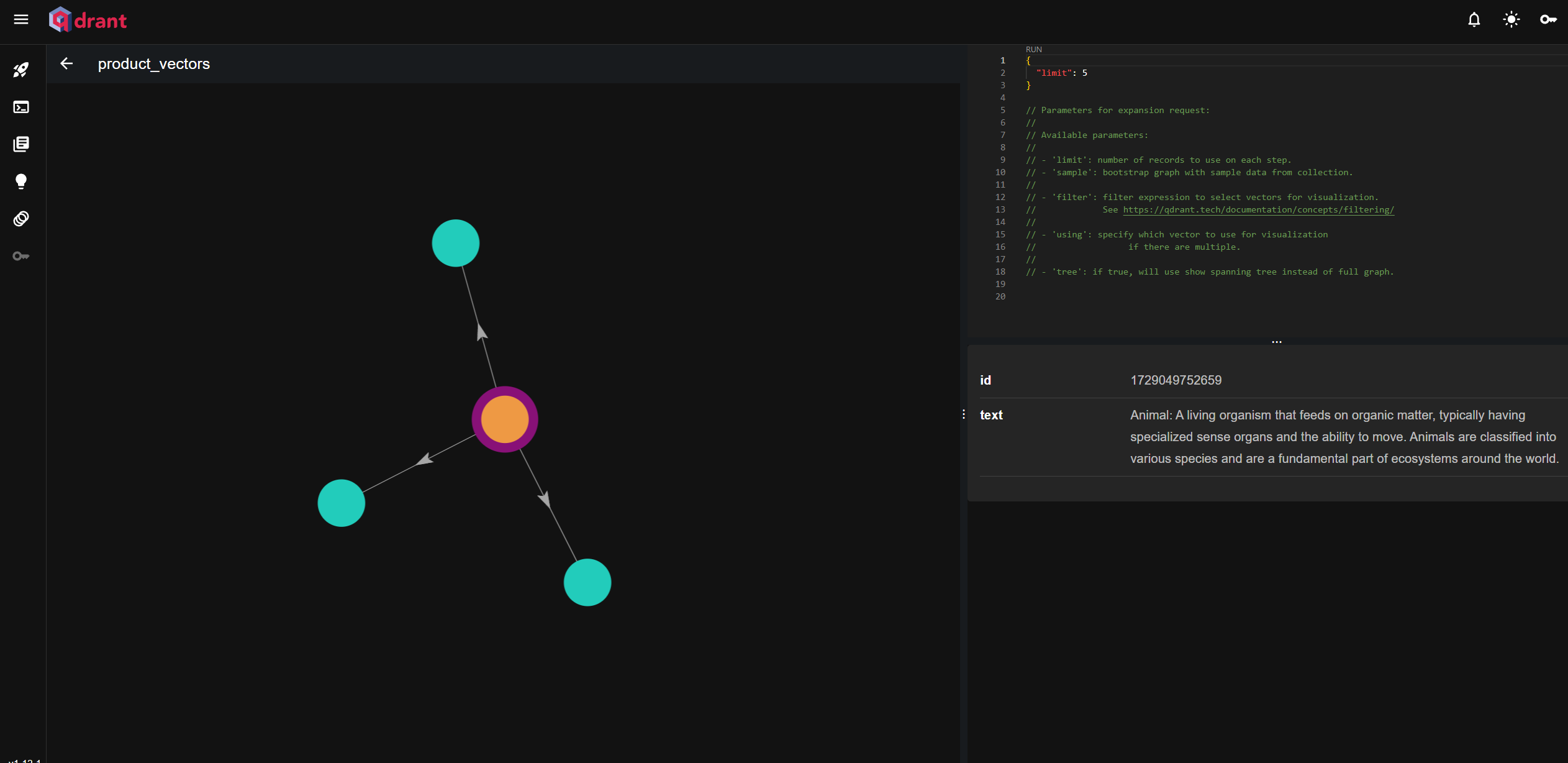
Qdrant 是一個非常熱門的向量數據庫,用於儲存和檢索高維度向量資料,適合做相似度查詢,例如推薦系統和文字、以圖搜尋,且擁有簡單易用的 RESTful API 和可視化儀表板來管理和查看向量數據。
啟動 qdrant 向量資料庫容器
docker run -d --name qdrant-container -p 6333:6333 --restart=always qdrant-container qdrant/qdrant
訪問 Dashboard
http://localhost:6333/dashboard
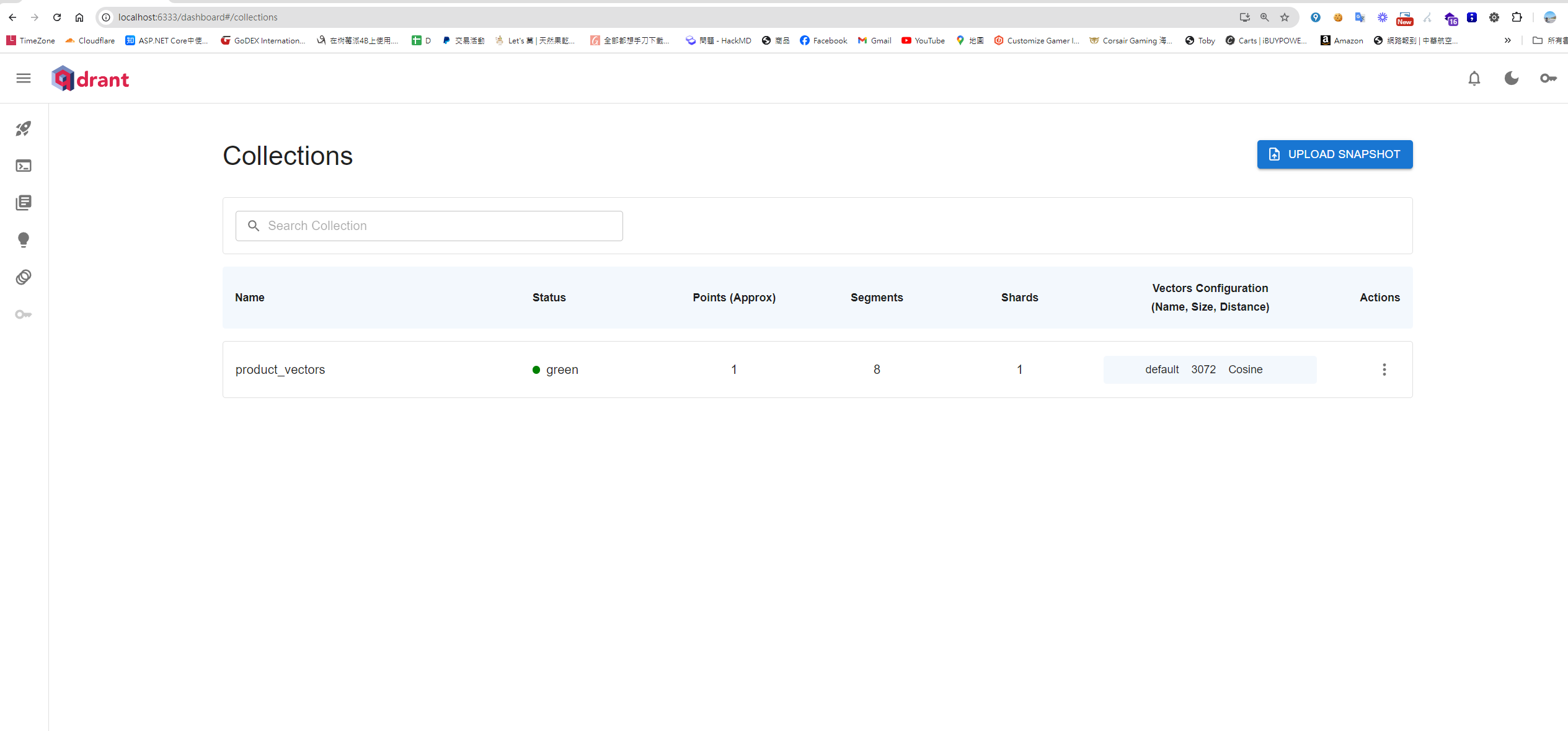
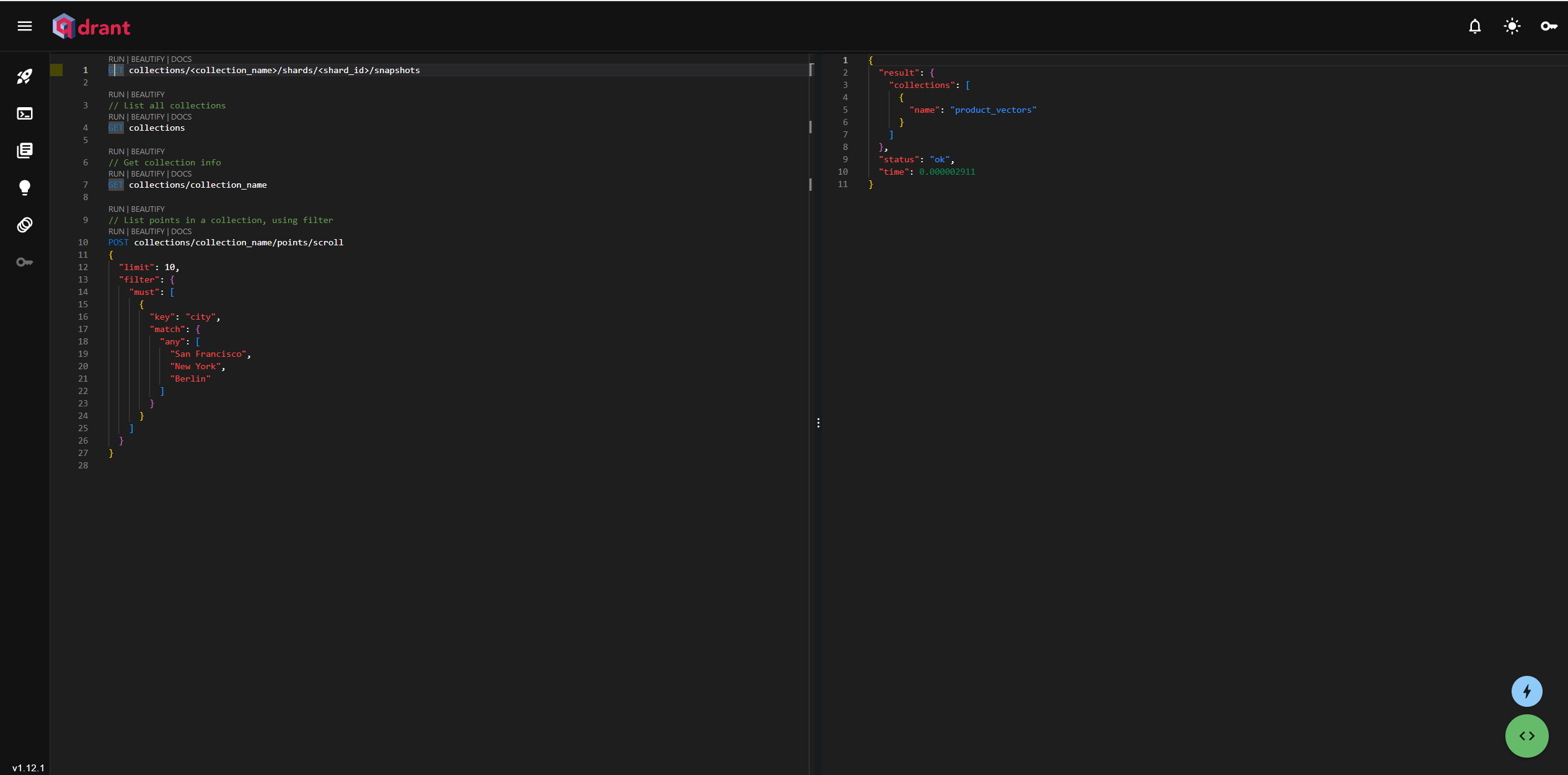
也支援 Restful api 操作向量資料庫
##  測試健康度
curl http://127.0.0.1:6333/healthz

## 取得所有的集合
curl -X GET "http://localhost:6333/collections"
安裝相關套件
npm install @qdrant/js-client-rest --save
接著,先寫一個NextJS API ,使用 Llama 去 Embedding 新增資料到 Collection (/api/lang-chain/insert-vector-database)
import { OllamaEmbeddings } from '@langchain/ollama';
import { QdrantClient } from '@qdrant/js-client-rest'; // 引入 Qdrant 客戶端
import { NextApiRequest, NextApiResponse } from 'next';

// 初始化 Qdrant 客戶端
const qdrantClient = new QdrantClient({ url: 'http://localhost:6333' });

// 初始化 OllamaEmbeddings
const embeddings = new OllamaEmbeddings({
    model: 'llama3.2',
    baseUrl: 'http://localhost:11434',
});

// 定義集合名稱
const collectionName = 'product_vectors';

// 定義向量點的界面
interface VectorPoint {
    id: number | string;
    vector: number[];
    payload: { text: string };
}

// 定義 Next.js API 處理器
export default async function handler(req: NextApiRequest, res: NextApiResponse) {
    try {
        const { text } = req.body;

        // 檢查是否有文字內容;
        if (!text) {
            return res.status(400).json({ message: '文字內容為必填項' });
        }

        // 生成文字的嵌入向量
        const vector: number[] = await embeddings.embedQuery(text);

        // 定義要插入的點
        const points: VectorPoint[] = [
            {
                id: Date.now(), // 使用當前時間作為唯一 ID
                vector: vector, // 插入生成的向量
                payload: { text }, // 存放文字數據
            },
        ];

        // 檢查集合是否已存在,若不存在則創建
        try {
            const collectionExists = await qdrantClient.getCollection(collectionName);

            if (!collectionExists) {
                await qdrantClient.createCollection(collectionName, {
                    vectors: {
                        size: 1000, // 向量大小
                        distance: 'Cosine', // 距離度量使用 Cosine
                    },
                });
            }
        } catch (error) {
            console.log(`集合 ${collectionName} 不存在,正在創建...`);
            await qdrantClient.createCollection(collectionName, {
                vectors: {
                    size: vector.length,
                    distance: 'Cosine',
                },
            });
        }

        // 將向量插入 Qdrant
        await qdrantClient.upsert(collectionName, { points });

        res.status(200).json({ message: '向量已成功插入 Qdrant' });
    } catch (error) {
        console.error('插入向量時發生錯誤:', error);
        res.status(500).json({ message: '插入向量時發生錯誤', error: error });
    }
}
使用方法
# Dumpling
curl -X POST http://localhost:3001/api/lang-chain/insert-vector-database \
  -H "Content-Type: application/json" \
  -d '{"text": "Dumpling: A small dough pocket, often filled with meat, vegetables, or other ingredients, commonly boiled or steamed. Dumplings, such as Chinese \"shui jiao,\" are a popular dish in many cultures and can be served with various dipping sauces."}'
再寫一個NextJS API ,透過 Llama 去把相量資料庫,相似的東西取回來 (/api/lang-chain/query-vector-database)
import { OllamaEmbeddings } from '@langchain/ollama';
import { QdrantClient } from '@qdrant/js-client-rest'; // 引入 Qdrant 客戶端
import { NextApiRequest, NextApiResponse } from 'next';

// 初始化 qdrant 客戶端
const qdrantClient = new QdrantClient({ url: 'http://localhost:6333' });

// 初始化 OllamaEmbeddings
const embeddings = new OllamaEmbeddings({
    model: 'llama3.2',
    baseUrl: 'http://localhost:11434',
});

// 定義集合名稱
const collectionName = 'product_vectors';

// 定義 Next.js API 查詢處理器
export default async function handler(req: NextApiRequest, res: NextApiResponse) {
    try {
        const { text } = req.body;

        // 檢查是否有文字內容
        if (!text) {
            return res.status(400).json({ message: '文字內容為必填項' });
        }

        // 生成文字的嵌入向量
        const vector: number[] = await embeddings.embedQuery(text);

        // 使用生成的向量在 Qdrant 中查詢相似的向量
        const searchResults = await qdrantClient.search(collectionName, {
            vector: vector,
            limit: 5, // 查詢的最大結果數量
        });

        res.status(200).json({ results: searchResults });
    } catch (error) {
        console.error('查詢向量時發生錯誤:', error);
        res.status(500).json({ message: '查詢向量時發生錯誤', error: error });
    }
}
使用方法
curl -X POST http://localhost:3001/api/lang-chain/query-vector-database \
  -H "Content-Type: application/json" \
  -d '{"text": "What is LangChain"}'
回傳的結果
{
  "results": [
    {
      "id": 1728983487057,
      "version": 0,
      "score": 0.41997233, => 相似度
      "payload": {
        "text": "LangChain is the framework for building context-aware reasoning applications" => 回傳的資料
      }
    }
  ]
}
進階查詢應用
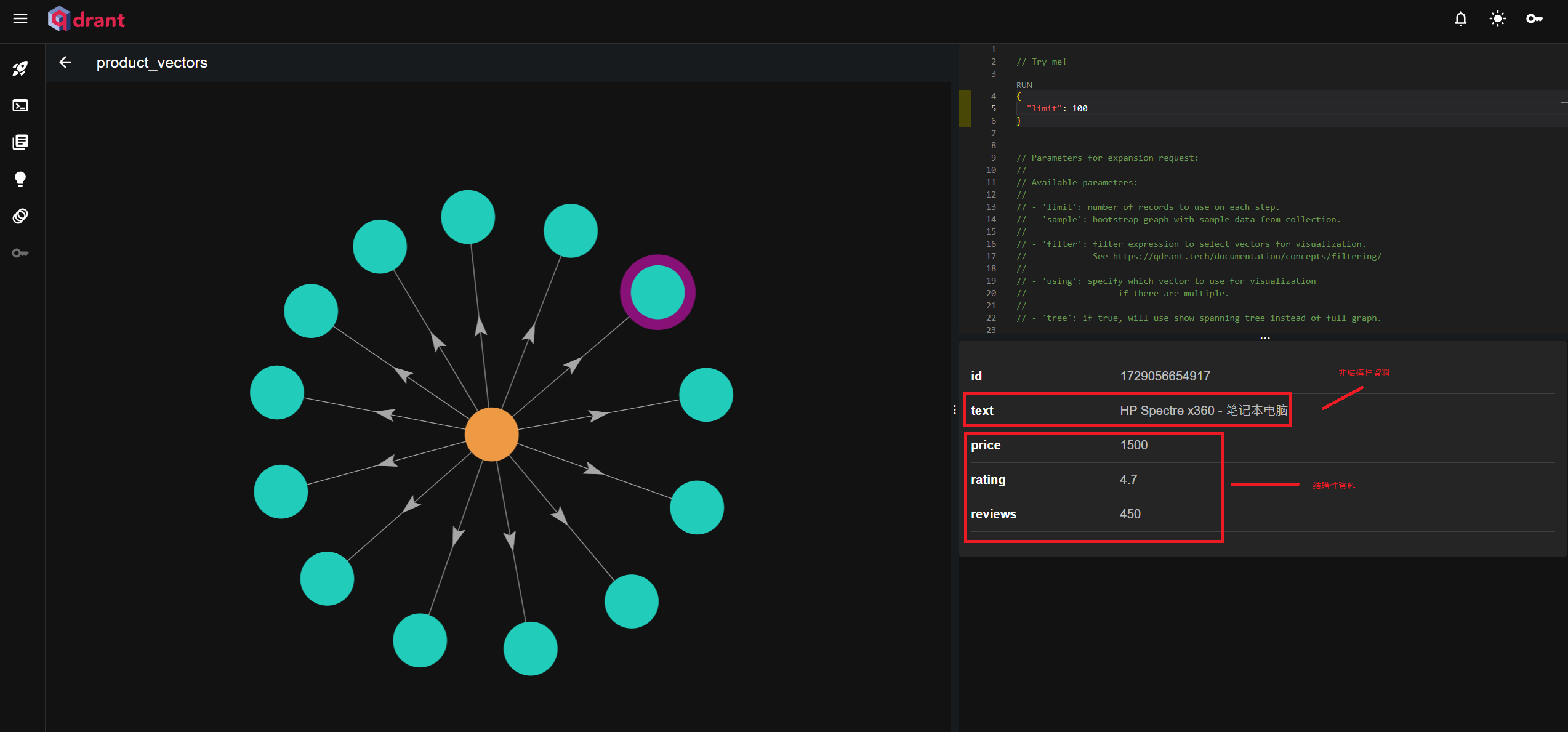
插入結構
向量資料庫可以存放結構性資料及非結構資料,依據結構化資料,可以使查詢會更為精準
插入非結構性資料
qdrantClient.upsert({
    collection_name: 'your_collection_name',
    points: [
        {
            id: 1, // 唯一識別符
            vector: vector, // 向量資料
            payload: { text: "your_original_text" } // 非結構化資料作為 payload 插入
        }
    ]
});
插入結構性資料
 qdrantClient.upsert({
    collection_name: 'products_collection',
    points: [
        {
            id: productData.id, // 唯一識別符
            vector: productData.features, // 插入特徵向量
            payload: { // 結構化資料作為 payload 插入
                name: productData.name, // 結構化資料
                price: productData.price, // 結構化資料
                rating: productData.rating, // 結構化資料
                category: productData.category // 結構化資料
            }
        }
    ]
});
進階查詢參數
向量資料庫可以存放結構性資料舉非結構性資料,所以也能透過特定的屬性去查詢
const searchResults = await qdrantClient.search(collectionName, {
    vector: [0.5, 0.2, ...], // 用於查詢的向量
    limit: 5, // 限制返回 5 筆結果
    filter: {
        must: [
            {
                key: 'price',
                range: {
                    gte: 1000, // 價格至少 1000
                    lte: 2000  // 價格最多 2000
                }
            },
        ]
    },
    hnsw_ef: 200, // 調整查詢效率
    with_payload: true, // 返回結果中的 payload 資料
    score_threshold: 0.7, // 只返回相似度高於 0.7 的結果
});
最近使用 AI 的心得
最近蠻有感的,AI 出現確實拿走了一些基礎工作,透過用AI,工程師可以做更多的事,也提昇學習東西效率;隨著各種知識學習門檻變得簡單,很多知識,可以透過和AI 聊天就學會,人們獲取知識也更容易,我們花更多時間擷取知識、洞察、規劃、驗證及下決策。
參考資料
此系列相關文章
- 使用 Langchain 和開源 Llama AI 在 Next.js 打造 AI Bot API Part 1 - 從了解 lanchain 開始
- 使用 Langchain 和開源 Llama AI 在 Next.js 打造 AI Bot API Part 2 - 打造 AI 具有記憶功能的 AI Agent
- 使用 Langchain 和開源 Llama AI 在 Next.js 打造 AI Bot API Part 3 - 加入向量資料庫,讓AI擁有額外的腦袋
- 使用 Langchain 和開源 Llama AI 在 Next.js 打造 AI Bot API Part 4 - AI產品推薦 API


留言